 Kakobuy Spreadsheet QC Scope
Kakobuy help centre map, glossary and FAQ
The help centre answers most questions this guide raises, once you know it exists. Where it hides, which words unlock it, and the frequently asked points with their article ids.
Where the help centre hides
Site header, read 2026-10-10Need help mid-order and the main navigation will not show it: the help centre sits one click deep, under More functions in the header, a dropdown holding exactly one item. Inside, articles are grouped under Daily Questions headings like Types of services, After-Sale Service and Usernotices, and every article carries the id this guide cites. Bookmark it on day one; the ids in our lookup all resolve there.

Glossary and frequently asked points
Help ids as cited per answerThe glossary of terms you'll see on the records: Stocked in, the status flip that starts the 120-hour clock. OG number, the order id support and the photo service key off. QC Picture, the default stock-in thumbnails. Extra photo, the row control that buys the Personalized photograph. Special Standards, the sealed class that must stay sealed. Rehearsal Packing, the paid pre-pack weight check. Waybill, the shipping request that ends the warehouse stage. Image search, the camera button inside the main search bar, for working backwards from a photo. Community shorthand you'll meet in threads: GL for a green light on a find, RL for the opposite; neither is official vocabulary, and no help article grades finds that way.

The warehouse check and its price
Inspection and consolidation are listed as free in help id 79. The paid services are optional: Personalized photograph at 2 yuan per piece (help id 114) and the usual packing extras at waybill time.
The number of default QC pictures
The help centre does not publish a count for stock-in pictures, and this site will not invent one. What is published: the free parcel-photo service delivers three photos covering packing and the sealed parcel when you tick it at waybill submission (help id 118).
Authenticity and the check
No. The Anti-Counterfeiting Policy (help id 125) bans non-authentic products outright and reserves the right to dispose of them. For electronics the rules say authenticity, function and quality are not checked at all (help id 76). The check describes appearance; it does not certify goods.
The start of the 120-hour window
At the next full hour after your order status changes to "Stocked in", per help id 51. Five days means 120 hours. The delivery date does not start this clock; check your warehouse record before shipping.
Items that arrive factory-sealed
They stay sealed. The warehouse checks the outer appearance only (help id 89), and opening a "Special Standards" product yourself ends its return eligibility (help id 51).
Photos of a specific detail
Buy Personalized photograph, then put the OG order number and the exact request in the Remarks box, for example a chest logo close-up or a measured length. Photos arrive by internal message within 24 hours (help id 114).
Storage while you decide
The free window is 100 days from "in storage", with a reminder email at day 90 (help id 1). After expiry an extension costs 10 yuan per OG order per 30 days, a price that changed from the mid-2026 setting of 20 yuan per 100 days (help id 120, read 2026-10-10).
Contact paths when something goes wrong
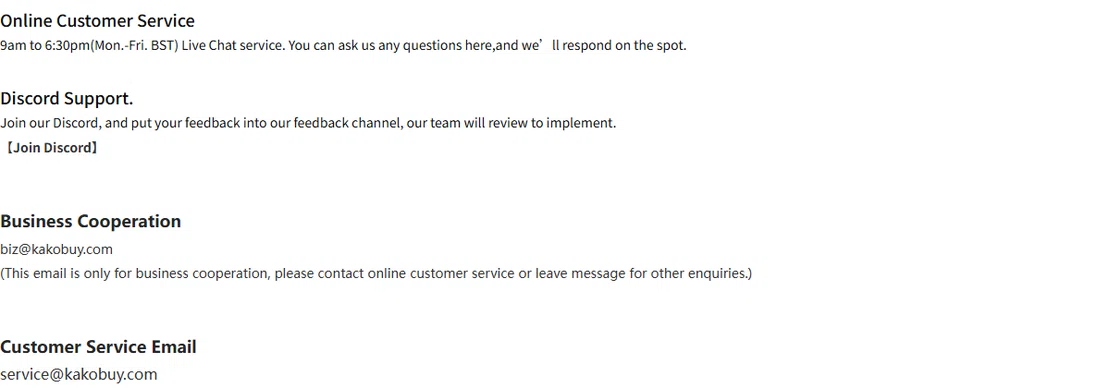
Contact page, read 2026-10-10Four published support channels, each with its stated lane: online customer service on weekday hours for order problems, a Discord server for community questions, a business address for cooperation, and the customer service email for everything written. Live chat runs 9am to 6:30pm Monday to Friday, BST, per the contact page. For disputes inside the 120-hour window, start with the order record and its OG number; screenshots of the QC strip move conversations faster than adjectives. This guide's own corrections inbox is in the footer, for dead links and stale text here, not for order support.
Most answers live behind that one dropdown: account first, then the help centre is a search box away.
Open the official Kakobuy siteCheck an item type first