 Kakobuy Spreadsheet QC Scope
Kakobuy parcel photo and Personalized photograph
Two photo services with different jobs: stock-in thumbnails that arrive by default, and a 2-yuan-per-piece close-up you direct yourself. Plus the free 3-shot parcel photo at waybill time, and when each one is worth asking for.
Help ids 114, 118 · read 2026-10-10Stock-in pictures on the warehouse record
Official tutorial + help id 114When an order turns "Stocked in", its record in User Center picks up a QC Picture strip: small thumbnails shot during the check, attached to the order line. The help centre does not publish a fixed count for them, and neither will this site.
Read the thumbnails against the published scope, not against hope: for an opened item they document model, style and the size reference; for a sealed pack they show the outside. They are evidence of what the check read, not a promise of quality.
The strip is also your trigger. The moment thumbnails exist, the 120-hour window is burning, so the review habit belongs to stock-in day.
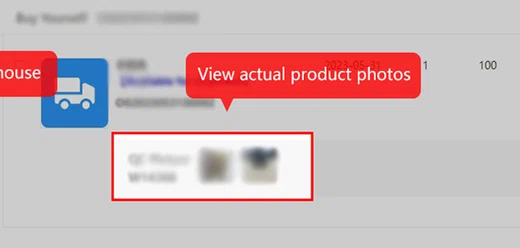
Personalized photograph, 2 yuan per detail you name
Help id 114
The paid service is not more of the same thumbnails. You buy it per piece, put the OG order number in the Remarks box, and name the exact shot you want: a chest logo close-up, a measured garment length, the serial sticker on a device port. Photos come back by internal message within 24 hours, per help id 114.
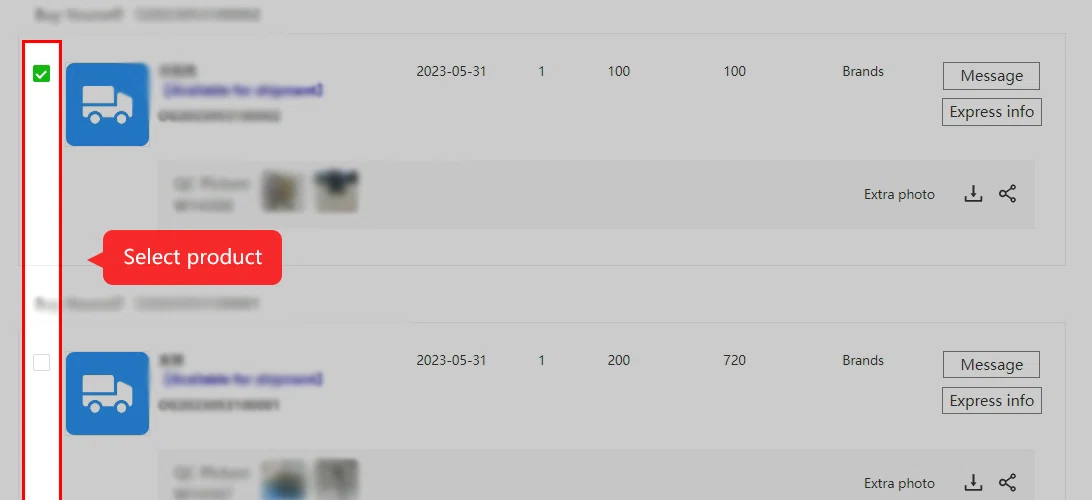
The Extra photo control sits on the same warehouse row as the default thumbnails, so the escalation path is one click from the evidence that made you doubt. Use a specific photo request when it can resolve a question that the existing images leave unanswered; check the current price before ordering.
Be literal in the request. "More photos" gets you more angles of the same fold; "measure chest width flat in cm" gets you a number you can compare with the listing grid.
Write a request that names the missing evidence
“Please send more QC” leaves the photographer to guess. For a hoodie, ask for the garment laid flat, with a ruler from armpit to armpit, in centimetres, and both ruler endpoints visible. For a bag, name the fastening, inside pocket or strap attachment you need to see. Link the request to the order identifier and intended variant.
Choose the service according to the question. A close-up shows a detail, a measurement adds scale, and a parcel photograph records the packed shipment. They do not prove the same thing. A label photograph can confirm that the seller sent size L without establishing whether its dimensions will fit you.
Read the current price, service scope and request instructions before ordering an extra photograph. The screenshot locates the Extra photo control on an archived warehouse row; its example dates and weights are not current order data, and a thumbnail count does not establish the standard service entitlement.
The free parcel photo at waybill time
Help id 118The third service costs nothing and is the easiest to miss: when you submit the waybill, tick the parcel-photo option and the packer delivers three photos covering packing and the sealed parcel, per help id 118. The dated article describes a photo of the product placement before sealing, plus views of the sealed parcel and, for actual-weight routes, its measured weight.
These images document the packing stage. Keep them with your shipping record; they do not replace detailed item inspection or establish an insurance claim by themselves.
For sealed goods it quietly does one more thing: the shot shows the sealed pack placed in your box, the closest look the service can give without breaking the seal.

Reviewing the QC pictures inside the window
Help id 51 timing + tutorial screensHow to review the QC record without a grading scale: open the thumbnails the day they appear, put the listing beside them, and walk the published checklist. Model and style match the listing photos. Size tag or measurement matches the final comment you wrote. Visible damage anywhere. Accessories present for a counted device. Anything off, buy the close-up or open the return, while the window is open.
Do not use the delivery date to calculate a warehouse return deadline. Resolve a visible issue before authorising shipping and check the deadline shown on your order record.
After the photos, the waybill and the lines
Official About text + site art, exported 2026-06-17Photos reviewed, returns settled, the stage ends with a waybill: pick the parcels, choose a shipping line for your destination, and the warehouse packs once for the international leg. Line choices, transit windows and route notes are published on the official site and change often, so this guide quotes none of them. The one stable fact worth repeating comes from the operator's own About text: the international leg is carried by third-party logistics companies, which is why damage in transit is an insurance topic, not a check topic.
The photo services only exist inside an account: register first, then the QC strip and the Extra photo control appear on every stocked order.
Open the official Kakobuy siteCheck an item type first